Rename screenshots, photos and PDFs
by what's inside them.
You know the photo is in there somewhere, but it's called IMG_5521.PNG, and so is
everything else. Monikr looks inside your images, screenshots and PDFs and gives each one a name that makes it
easy to find.
For macOS 26 and later. Nothing is renamed until you click Rename, and Undo puts it all back.
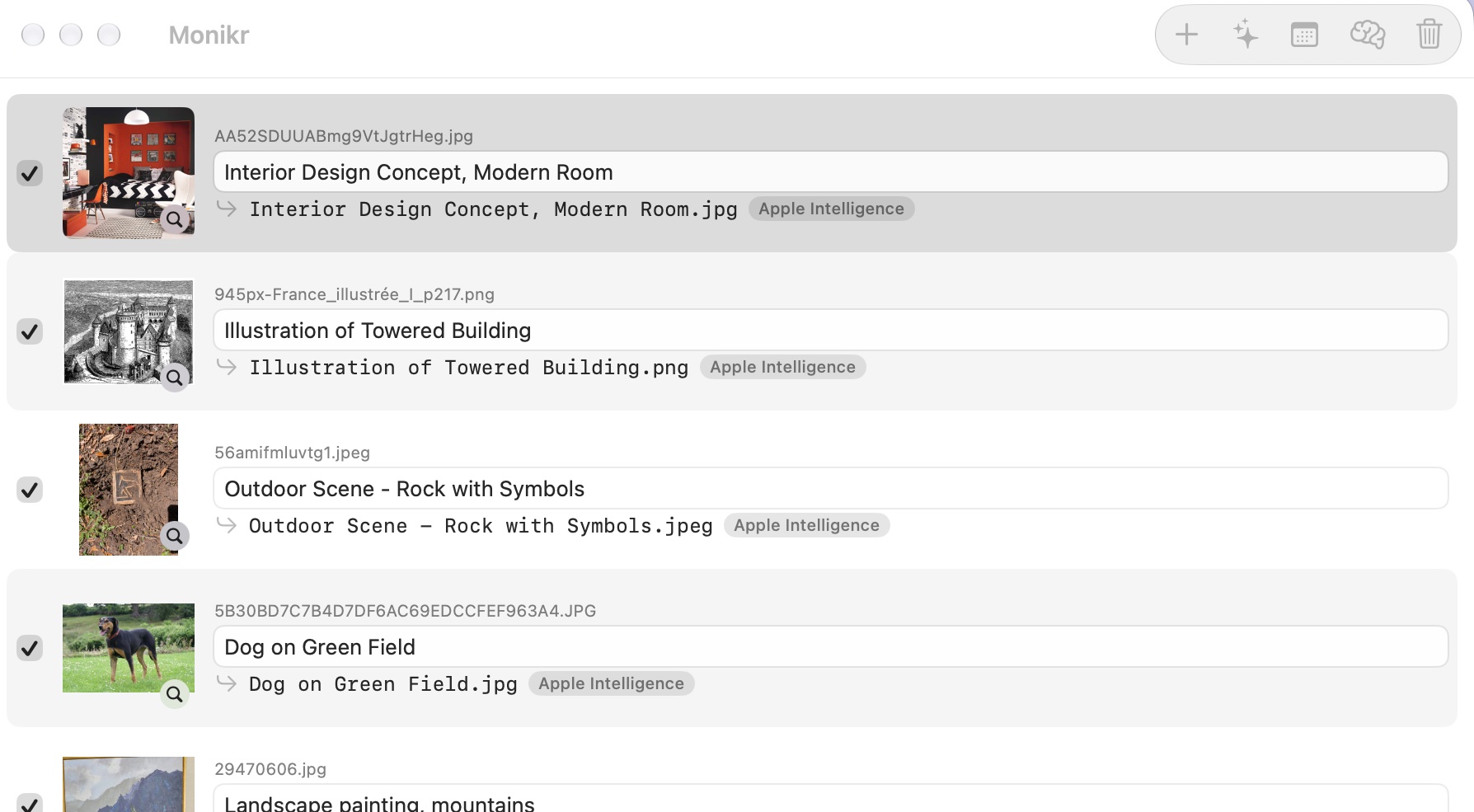
images/screenshots/monikr-window.jpgNames that say what the file is
Real suggestions from Apple Intelligence, running on the Mac.
| Before | After |
|---|---|
IMG_5521.PNG | Check Deposit $8,207.78.png |
IMG_0001.jpg | 2008-05-23 Evening Scene in Carcassonne.jpg |
Screenshot 2023-06-06 at 7.45.59 AM.png | Storage Device - Hard Drive.png |
scan0001.pdf | Lease Agreement - Oakwood Property.pdf |
A smarter way to rename files on Mac
Names files by their contents
Reads the text in documents and screenshots, what's in a photo, the amount on a receipt, and where a picture was taken. Works with PNG, JPEG, HEIC and PDF.
Written by Apple Intelligence
Names are written right on your Mac, with no account or API key. For a small batch, Apple Cloud can recognize more, within Apple's usage limits.
Automatically rename screenshots
Turn it on and each new screenshot gets a real name a few seconds after you take it. Files you've already named are left alone.
Batch rename from Finder
Select files or a whole folder, right-click and choose Monikr. Check every name before anything changes.
Name a whole event at once
Give a batch of wedding or vacation photos one name, numbered in order, with an optional description of each.
Safe renaming with Undo
Monikr never overwrites a file. If a name is taken it adds a number, and Undo puts the last batch back exactly as it was.
From 1234.png to Smith Wedding 001
Got a few hundred photos with meaningless names? Click Name as Event, type the event's name, and check the preview.
- Numbered is nearly instant: Smith Wedding 001, 002, 003
- Numbered with a description adds what's in each photo
- Photos follow the order they were taken when every photo records it, otherwise their file names
- Adding more later? Choose the number to start from
Your wedding folder
1234.png → Smith Wedding 001.png
1235.png → Smith Wedding 002.png
1434.png → Smith Wedding 201.png
With descriptions
1236.png → Smith Wedding 003 - Cutting the Cake.png
How to batch rename files on Mac
Add files
Drop them on the window or the Dock icon, or right-click them in Finder.
Check the names
Edit any suggestion. Click a thumbnail, or press Space, to see the file full size.
Rename
One click renames them all. Changed your mind? Press ⌘Z.
Questions
How do I automatically rename screenshots on a Mac?
Turn on Auto-name new screenshots in Monikr. Each new screenshot in your screenshot folder (the Desktop unless you changed it) gets a descriptive name a few seconds after you take it.
How do I rename a batch of wedding or event photos?
Add the photos to Monikr, click Name as Event and type a name like Smith Wedding. Choose numbered names, or numbers with a description of each photo. Then check the list and click Rename.
Can I batch rename photos and PDFs by what's in them?
Yes. Drop files or a whole folder on Monikr, or right-click them in Finder. It suggests a name for each one from its text and contents and, for photos, the date and place it was taken. You can edit any name before renaming.
Does Monikr upload my files?
Not with Apple Intelligence or Basic naming, which run entirely on your Mac. Apple Cloud is optional, and sends each image to Apple's Private Cloud Compute, which Apple says doesn't store your data. Photo locations send only GPS coordinates to Apple Maps, and you can turn that off. Nothing is sent to Blinken Labs. See the privacy policy.
Do I need Apple Intelligence?
No. Basic naming works on any Mac running macOS 26 or later, using the text in each file. Apple Intelligence gives better names on Macs that support it. Apple Cloud is best for small batches, because Apple limits how much it can be used.
Which file types can it rename?
Images, including PNG, JPEG, HEIC, TIFF and GIF, plus screenshots and PDFs, including scanned PDFs.
Can I undo a rename?
Yes. Press ⌘Z or click Undo to put the last batch of names back. Monikr never overwrites a file; if a name is taken, it adds a number.
Monikr for Mac
 Coming soon · macOS 26 and later
Monikr
Not available to download yet. Apple Intelligence naming needs a Mac that supports Apple Intelligence. Apple Cloud naming uses a one-time shortcut, and the app walks you through it.